在Claude Code使用Agent Skills
在 Claude Code 中创建、管理和分享技能,以扩展 Claude 的能力。
本指南将向您展示如何在 Claude Code 中创建、使用和管理智能体技能 (Agent Skills)。技能是模块化的能力单元,通过包含指令、脚本和资源的结构化文件夹来扩展 Claude 的功能。
先决条件
- Claude Code 1.0 或更高版本
- 对 Claude Code 有基本了解
Claude Code中的各种技能比较:
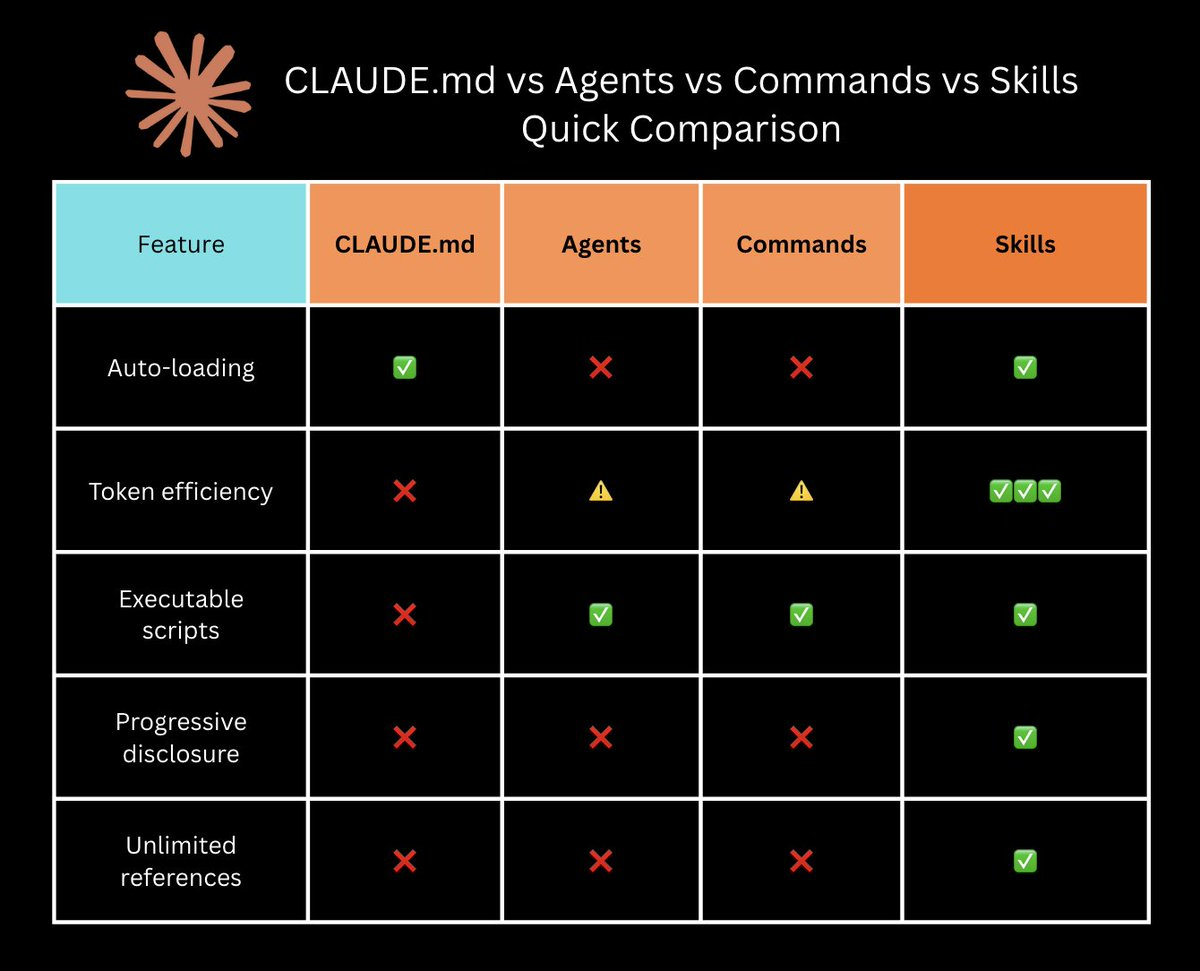
什么是智能体技能 (Agent Skills)?
智能体技能将专业知识打包成可被发现的能力。每个技能都包含一个 SKILL.md 文件,其中有 Claude 在需要时会读取的指令,以及可选的支持文件,如脚本和模板。
技能如何被调用:技能是由模型调用的 (model-invoked) —— Claude 会根据您的请求和技能的描述自主决定何时使用它们。这与斜杠命令 (slash commands) 不同,后者是由用户调用的 (user-invoked)(您需要明确输入 /command 来触发它们)。
优势:
- 为您的特定工作流程扩展 Claude 的能力
- 通过 git 在团队中共享专业知识
- 减少重复的提示输入
- 组合多个技能以完成复杂任务
在Agent Skills概览中了解更多信息。
如需深入了解智能体技能的架构和实际应用,请阅读我们的工程博客:通过智能体智能(Agent Skills)为真实世界装备智能体。
创建一个技能
技能以包含 SKILL.md 文件的目录形式存储。
Personal Skills
Personal Skills在您所有的项目中都可用。将它们存储在 ~/.claude/skills/ 中:
1 | mkdir -p ~/.claude/skills/my-skill-name |
Personal Skills可用于:
- 您的个人工作流程和偏好
- 您正在开发的实验性技能
- 个人生产力工具
Project Skills
Project Skills与您的团队共享。将它们存储在项目中的 .claude/skills/ 目录下:
1 | mkdir -p .claude/skills/my-skill-name |
Project Skills可用于:
- 团队工作流程和规范
- 特定于项目的专业知识
- 共享的实用工具和脚本
Project Skills会被提交到 git 中,并自动对团队成员可用。
Plugin Skills
技能也可以来自 Claude Code 插件。插件可以捆绑一些技能,这些技能在插件安装后会自动可用。这些技能的工作方式与个人和项目技能相同。
编写 SKILL.md
创建一个 SKILL.md 文件,其中包含 YAML frontmatter 和 Markdown 内容:
1 | --- |
description 字段对于 Claude 发现何时使用您的技能至关重要。它应该既包含技能的功能,也包含 Claude 应该在何时使用它。
请参阅最佳实践指南以获取完整的编写指南。
添加支持文件
在 SKILL.md 旁边创建其他文件:
1 | my-skill/ |
在 SKILL.md 中引用这些文件:
1 | For advanced usage, see [reference.md](reference.md). |
Claude 仅在需要时读取这些文件,通过渐进式披露 (progressive disclosure) 来高效管理上下文。
使用 allowed-tools 限制工具访问
使用 allowed-tools frontmatter 字段来限制 Claude 在技能激活时可以使用的工具:
1 | --- |
当此技能激活时,Claude 只能使用指定的工具(Read、Grep、Glob),而无需请求许可。这对于以下情况很有用:
- 不应修改文件的只读技能
- 范围有限的技能(例如,仅进行数据分析,不写入文件)
- 您希望限制能力的安全敏感工作流程
如果未指定 allowed-tools,Claude 将按照标准的权限模型,正常请求使用工具的许可。
allowed-tools仅在 Claude Code 的技能中受支持。
查看可用技能
Claude 会自动从三个来源发现技能:
- 个人技能:
~/.claude/skills/ - 项目技能:
.claude/skills/ - 插件技能:与已安装的插件捆绑在一起
要查看所有可用的技能,直接询问 Claude:
1 | What Skills are available? |
或
1 | List all available Skills |
这将显示来自所有来源的所有技能,包括插件技能。
要检查特定的技能,您也可以查看文件系统:
1 | List personal Skills |
测试一个技能
创建技能后,通过提出与您的描述相匹配的问题来对其进行测试。
示例:如果您的描述中提到了“PDF 文件”:
1 | Can you help me extract text from this PDF? |
Claude 会自主决定是否使用您的技能,如果它与请求匹配的话——您无需显式调用它。技能会根据您问题的上下文自动激活。
调试一个技能
如果 Claude 没有使用您的技能,请检查以下常见问题:
使描述更具体
过于模糊:
1 | description: Helps with documents |
具体:
1 | description: Extract text and tables from PDF files, fill forms, merge documents. Use when working with PDF files or when the user mentions PDFs, forms, or document extraction. |
在描述中同时包含技能的功能和使用时机。
验证文件路径
个人技能: ~/.claude/skills/skill-name/SKILL.md
项目技能: .claude/skills/skill-name/SKILL.md
检查文件是否存在:
1 | Personal |
检查 YAML 语法
无效的 YAML 会阻止技能加载。验证 frontmatter:
1 | cat SKILL.md | head -n 10 |
确保:
- 开头的
---在第 1 行 - 结尾的
---在 Markdown 内容之前 - 有效的 YAML 语法(无制表符,缩进正确)
查看错误
在调试模式下运行 Claude Code 以查看技能加载错误:
1 | claude --debug |
与团队共享技能
推荐方法:通过插件分发技能。
要通过插件共享技能:
- 创建一个在
skills/目录中包含技能的插件 - 将插件添加到市场
- 团队成员安装插件
有关完整说明,请参阅向您的插件添加技能。
您也可以直接通过项目仓库共享技能:
第 1 步:将技能添加到您的项目
创建一个项目技能:
1 | mkdir -p .claude/skills/team-skill |
第 2 步:提交到 git
1 | git add .claude/skills/ |
第 3 步:团队成员自动获取技能
当团队成员拉取最新更改时,技能将立即可用:
1 | git pull |
更新一个技能
直接编辑 SKILL.md:
1 | Personal Skill |
更改将在您下次启动 Claude Code 时生效。如果 Claude Code 已在运行,请重新启动以加载更新。
移除一个技能
删除技能目录:
1 | Personal |
最佳实践
保持技能专注
一个技能应该解决一个能力:
专注的:
- “PDF 表单填写”
- “Excel 数据分析”
- “Git 提交信息”
过于宽泛的:
- “文档处理”(应拆分为独立的技能)
- “数据工具”(应按数据类型或操作拆分)
编写清晰的描述
通过在描述中包含特定的触发词,帮助 Claude 发现何时使用技能:
清晰的:
1 | description: Analyze Excel spreadsheets, create pivot tables, and generate charts. Use when working with Excel files, spreadsheets, or analyzing tabular data in .xlsx format. |
模糊的:
1 | description: For files |
与您的团队一起测试
让团队成员使用技能并提供反馈:
- 技能是否在预期时激活?
- 指令是否清晰?
- 是否有遗漏的示例或边缘情况?
记录技能版本
您可以在 SKILL.md 内容中记录技能版本以跟踪更改。添加一个版本历史部分:
1 | # My Skill |
这有助于团队成员了解版本之间的变化。
故障排除
Claude 不使用我的技能
症状:您提出了一个相关问题,但 Claude 没有使用您的技能。
检查:描述是否足够具体?
模糊的描述会使发现变得困难。同时包含技能的功能和使用时机,并附上用户可能会提及的关键词。
过于通用的:
1 | description: Helps with data |
具体的:
1 | description: Analyze Excel spreadsheets, generate pivot tables, create charts. Use when working with Excel files, spreadsheets, or .xlsx files. |
检查:YAML 是否有效?
运行验证以检查语法错误:
1 | View frontmatter |
检查:技能是否在正确的位置?
1 | Personal Skills |
技能出现错误
症状:技能加载了但无法正常工作。
检查:依赖项是否可用?
当需要时,Claude 会自动安装所需的依赖项(或请求安装许可)。
检查:脚本是否有执行权限?
1 | chmod +x .claude/skills/my-skill/scripts/*.py |
检查:文件路径是否正确?
在所有路径中使用正斜杠(Unix 风格):
正确:scripts/helper.py 错误:scripts\helper.py(Windows 风格)
多个技能冲突
症状:Claude 使用了错误的技能,或者在相似的技能之间显得困惑。
在描述中要具体:通过在描述中使用独特的触发词,帮助 Claude 选择正确的技能。
不要这样:
1 | # Skill 1 |
应该这样:
1 | # Skill 1 |
示例
简单技能(单个文件)
1 | commit-helper/ |
1 | --- |
带有工具权限的技能
1 | code-reviewer/ |
1 | --- |
多文件技能
1 | pdf-processing/ |
SKILL.md:
1 | --- |
在描述中列出所需的包。在 Claude 可以使用它们之前,必须在您的环境中安装这些包。
Claude 仅在需要时加载附加文件。