编写Claude Agent Skills最佳实践
学习如何编写能被 Claude 发现并成功使用的有效 Agent Skills 。
什么是Skills?
智能体技能(Agent Skills)是模块化的能力单元,用于扩展 Claude 的功能。每一个“技能”都打包了指令(Instructions)、元数据(Metadata)以及可选的资源(Resources,如脚本、模板),Claude 会在相关时自动使用它们。
Skills是可复用的、基于文件系统的资源,它们为 Claude 提供了特定领域的专业知识,例如:工作流程、背景知识和最佳实践,从而将通用的智能体转变为领域专家。
与“提示”(Prompts)不同,“提示”是用于一次性任务的、在对话层面的指令;而“Skills”则能按需加载,并且避免了在多个不同对话中重复提供相同指导的需要。
Skill是如何工作的?
技能(Skills)利用 Claude 的虚拟机(VM)环境,提供了仅靠提示(prompts)无法实现的能力。
Claude 在一个具备文件系统访问权限的虚拟机中运行,这使得“Skills”可以作为包含指令、可执行代码和参考资料的目录存在,其组织方式就像你为新团队成员创建的入职指南一样。
这种基于文件系统的架构实现了渐进式披露(progressive disclosure):Claude 根据需要分阶段加载信息,而不是在一开始就占用所有上下文(context)。
三种技能内容,三个加载级别
技能可以包含三种类型的内容,每种内容在不同的时间加载:
第一级:元数据(Metadata,始终加载)
内容类型:指令。 技能的 YAML frontmatter 提供了用于发现(discovery)的信息:
1 |
|
Claude 在启动时加载这些元数据,并将其包含在系统提示中。这种轻量级的方法意味着你可以安装许多技能而不会产生上下文成本;Claude 仅仅知道每个技能的存在以及何时使用它。
第二级:指令(Instructions,触发时加载)
内容类型:指令。 SKILL.md 文件的主体部分包含了程序性知识:工作流程、最佳实践和操作指南:
1 |
|
当您提出的请求与某个技能的描述相匹配时,Claude 会通过 bash 从文件系统中读取 SKILL.md 文件。只有到那时,这部分内容才会进入上下文窗口。
第三级:资源与代码(Resources,按需加载)
内容类型:指令、代码和资源。 技能可以捆绑额外的材料:
1 | pdf-skill/ |
- 指令:额外的 Markdown 文件(
FORMS.md,REFERENCE.md),包含专门的指南和工作流程。 - 代码:可执行脚本(
fill_form.py,validate.py),Claude 通过 bash 来运行它们;这些脚本提供确定性的操作,而不会消耗上下文。 - 资源:参考材料,如数据库结构(schema)、API 文档、模板或示例。
Claude 仅在被引用时才会访问这些文件。这种文件系统模型意味着每种内容类型都有不同的优势:指令用于提供灵活的指导,代码用于保证可靠性,资源用于进行事实查找。
| 级别 | 加载时机 | Token 成本 | 内容 |
|---|---|---|---|
| 第一级:元数据 | 始终(启动时) | 每个技能约 100 tokens | 来自 YAML frontmatter 的名称和描述 |
| 第二级:指令 | 技能被触发时 | 低于 5k tokens | SKILL.md 文件的主体,包含指令和指南 |
| 第三级+:资源 | 按需加载 | 几乎无限制 | 通过 bash 执行的捆绑文件,其内容不会被加载到上下文中 |
渐进式披露确保了在任何给定时间,只有相关的内容才会占用上下文窗口。
Skills的架构
Skills在一个代码执行环境中运行,在这个环境中,Claude 拥有文件系统访问权、bash 命令和代码执行能力。
可以这样理解:Skills作为目录存在于虚拟机上,Claude 使用与你在自己电脑上浏览文件时相同的 bash 命令来与它们互动。
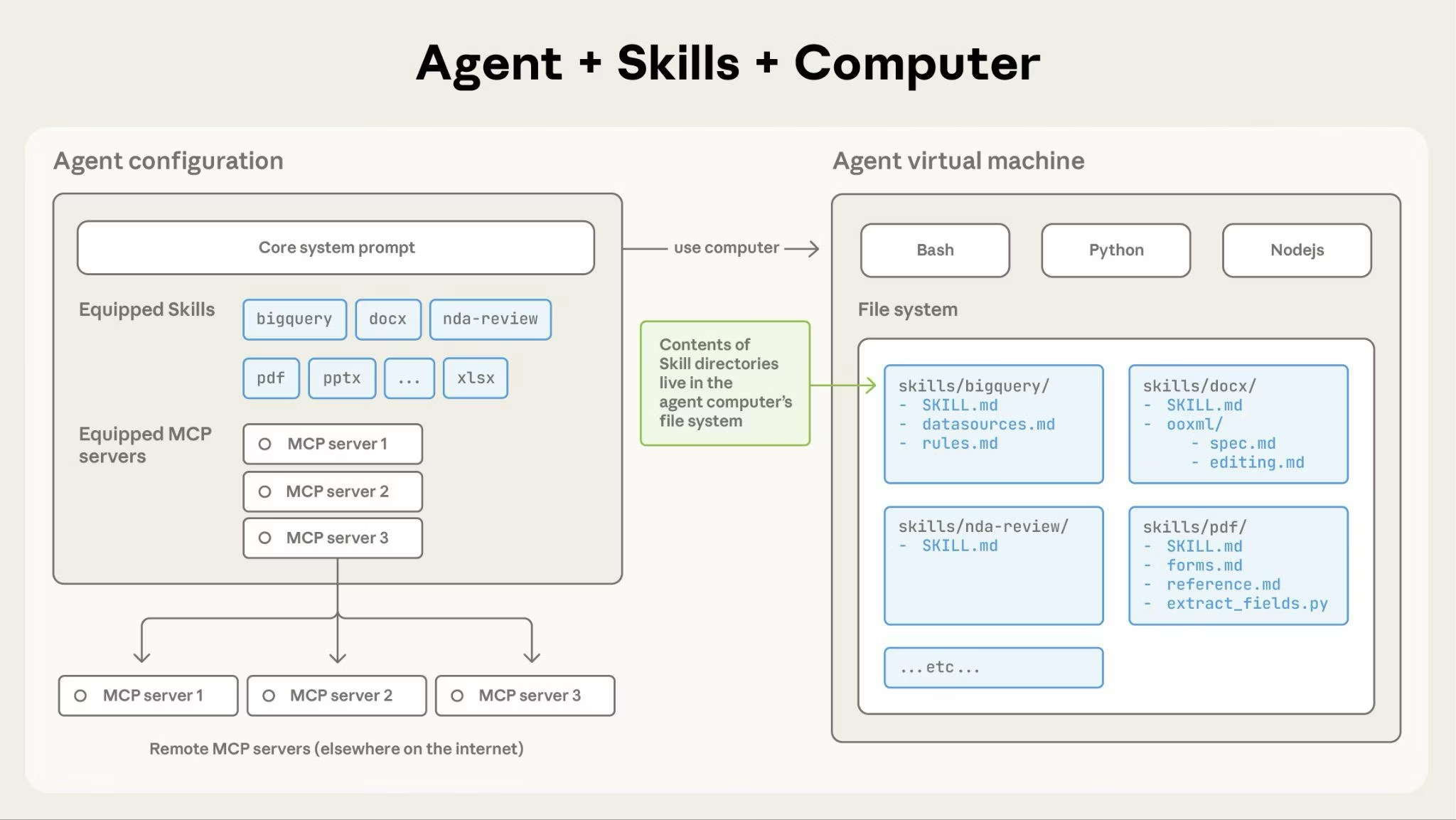
Claude 如何访问Skills内容:
当一个Skill被触发时,Claude 使用 bash 从文件系统中读取 SKILL.md,将其指令带入上下文窗口。如果这些指令引用了其他文件(如 FORMS.md 或数据库结构文件),Claude 也会使用额外的 bash 命令来读取这些文件。当指令中提到可执行脚本时,Claude 通过 bash 运行它们,并且只接收其输出(脚本代码本身永远不会进入上下文)。
这种架构带来了什么好处:
- 按需文件访问:Claude 只读取每个特定任务所需的文件。一个Skill可以包含数十个参考文件,但如果你的任务只需要销售数据库的结构,Claude 就只加载那一个文件。其余的文件保留在文件系统上,消耗零 Token。
- 高效的脚本执行:当 Claude 运行
validate_form.py时,该脚本的代码永远不会被加载到上下文窗口中。只有脚本的输出(例如“验证通过”或特定的错误信息)会消耗 Token。这使得脚本比让 Claude 动态生成等效代码要高效得多。 - 对捆绑内容无实际限制:因为文件在被访问之前不消耗上下文,所以Skills可以包含全面的 API 文档、大型数据集、丰富的示例或任何你需要的参考材料。对于未被使用的捆绑内容,不存在上下文成本。
这种基于文件系统的模型正是**渐进式披露(progressive disclosure)**得以实现的原因。Claude 浏览你的Skills,就像你查阅入职指南的特定章节一样,精确地访问每个任务所需要的内容。
核心原则
简洁是关键
上下文窗口是一项公共资源。您的 Skills 与 Claude 需要知道的所有其他信息共享上下文窗口,包括:
- 系统提示(System Instruction)
- 对话历史(Message History)
- 其他Skills的元数据(Skills meta data)
- 您的实际请求(User Prompt)
并非您 Skills 中的每个 token 都会立即产生消耗。在启动时,只会预加载所有 Skills 的元数据(名称和描述)。只有当某个 Skills 变得相关时,Claude 才会读取 SKILL.md,并且仅在需要时才会读取其他文件。然而,在 SKILL.md 中保持简洁仍然很重要:一旦 Claude 加载了它,每个 token 都会与对话历史和其他上下文竞争。
默认假设:Claude 已经非常聪明
只添加 Claude 尚不具备的上下文。对每一条信息提出挑战:
- “Claude 真的需要这个解释吗?”
- “我可以假设 Claude 知道这个吗?”
- “这段话的 token 消耗是否值得?”
好的例子:简洁(约 50 个 token):
1 | ## Extract PDF text |
不好的例子:过于冗长(约 150 个 token):
1 | ## Extract PDF text |
简洁的版本假设 Claude 知道什么是 PDF 以及库是如何工作的。
设置适当的自由度
将具体程度与任务的脆弱性和可变性相匹配。
高自由度(基于文本的指令):
在以下情况使用:
- 多种方法都有效
- 决策取决于上下文
- 启发式方法指导决策
例子:
1 | ## Code review process |
中等自由度(伪代码或带参数的脚本):
在以下情况使用:
- 存在首选模式
- 可接受一些变化
- 配置影响行为
例子:
1 | ## Generate report |
低自由度(特定脚本,少量或没有参数):
在以下情况使用:
- 操作脆弱且容易出错
- 一致性至关重要
- 必须遵循特定的顺序
例子:
1 | ## Database migration |
类比:把 Claude 想象成一个正在探索路径的机器人:
- 两边是悬崖的窄桥:只有一条安全的前进道路。提供具体的护栏和精确的指令(低自由度)。例子:必须按精确顺序运行的数据库迁移。
- 没有危险的开阔田野:许多路径都能成功。给出大致方向,相信 Claude 能找到最佳路线(高自由度)。例子:代码审查,其中上下文决定了最佳方法。
用所有你计划使用的模型进行测试
Skills 是模型的补充,因此其有效性取决于底层模型。用你计划使用的所有模型测试你的 Skills 。
按模型划分的测试注意事项:
- Claude Haiku(快速、经济): Skills 是否提供了足够的指导?
- Claude Sonnet(平衡): Skills 是否清晰高效?
- Claude Opus(强大的推理能力): Skills 是否避免了过度解释?
对 Opus 来说完美的东西,可能需要为 Haiku 提供更多细节。如果你计划在多个模型上使用你的 Skills ,目标是编写对所有模型都适用的指令。
Skills 结构
YAML Frontmatter:SKILL.md 的 frontmatter 支持两个字段:
name- Skills 的人类可读名称(最多 64 个字符)description- 一行描述,说明该 Skills 的作用以及何时使用(最多 1024 个字符)有关完整的 Skills 结构细节,请参阅 Skills 概述。
命名约定
使用一致的命名模式,使 Skills 更易于引用和讨论。我们建议对 Skills 名称使用动名词形式(动词 + -ing),因为这清晰地描述了 Skills 提供的活动或能力。
好的命名示例(动名词形式):
- “Processing PDFs”(处理 PDF)
- “Analyzing spreadsheets”(分析电子表格)
- “Managing databases”(管理数据库)
- “Testing code”(测试代码)
- “Writing documentation”(编写文档)
可接受的替代方案:
- 名词短语:“PDF Processing”、“Spreadsheet Analysis”
- 面向动作:“Process PDFs”、“Analyze Spreadsheets”
避免:
- 模糊的名称:“Helper”、“Utils”、“Tools”
- 过于通用:“Documents”、“Data”、“Files”
- 在你的 Skills 集合中使用不一致的模式
一致的命名使得以下操作更容易:
- 在文档和对话中引用 Skills
- 一目了然地了解 Skills 的作用
- 组织和搜索多个 Skills
- 维护一个专业、有凝聚力的 Skills 库
编写有效的描述
描述字段用于 Skills 发现,应包括 Skills 的作用和使用时机。
始终使用第三人称。描述被注入到系统提示中,不一致的视角可能会导致发现问题。
好:“Processes Excel files and generates reports”(处理 Excel 文件并生成报告)
避免:“I can help you process Excel files”(我可以帮你处理 Excel 文件)
避免:“You can use this to process Excel files”(你可以用这个来处理 Excel 文件)
具体并包含关键词。既要包括 Skills 的作用,也要包括何时使用的具体触发器/上下文。
每个 Skills 只有一个描述字段。描述对于 Skills 选择至关重要:Claude 用它从可能超过 100 个可用 Skills 中选择正确的 Skills 。你的描述必须提供足够的细节,让 Claude 知道何时选择此 Skills ,而 SKILL.md 的其余部分则提供实现细节。
有效的例子:
PDF 处理 Skills:
1 | description: Extract text and tables from PDF files, fill forms, merge documents. Use when working with PDF files or when the user mentions PDFs, forms, or document extraction. |
Excel 分析 Skills:
1 | description: Analyze Excel spreadsheets, create pivot tables, generate charts. Use when analyzing Excel files, spreadsheets, tabular data, or .xlsx files. |
Git 提交助手 Skills:
1 | description: Generate descriptive commit messages by analyzing git diffs. Use when the user asks for help writing commit messages or reviewing staged changes. |
避免像这样的模糊描述:
1 | description: Helps with documents |
1 | description: Processes data |
1 | description: Does stuff with files |
渐进式披露模式
SKILL.md 作为一个概述,根据需要将 Claude 指向详细材料,就像入职指南中的目录一样。有关渐进式披露工作原理的解释,请参阅概述中的 Skills 如何工作。
实用指南:
- 保持 SKILL.md 主体内容在 500 行以下以获得最佳性能
- 当接近此限制时,将内容拆分到单独的文件中
- 使用以下模式有效地组织指令、代码和资源
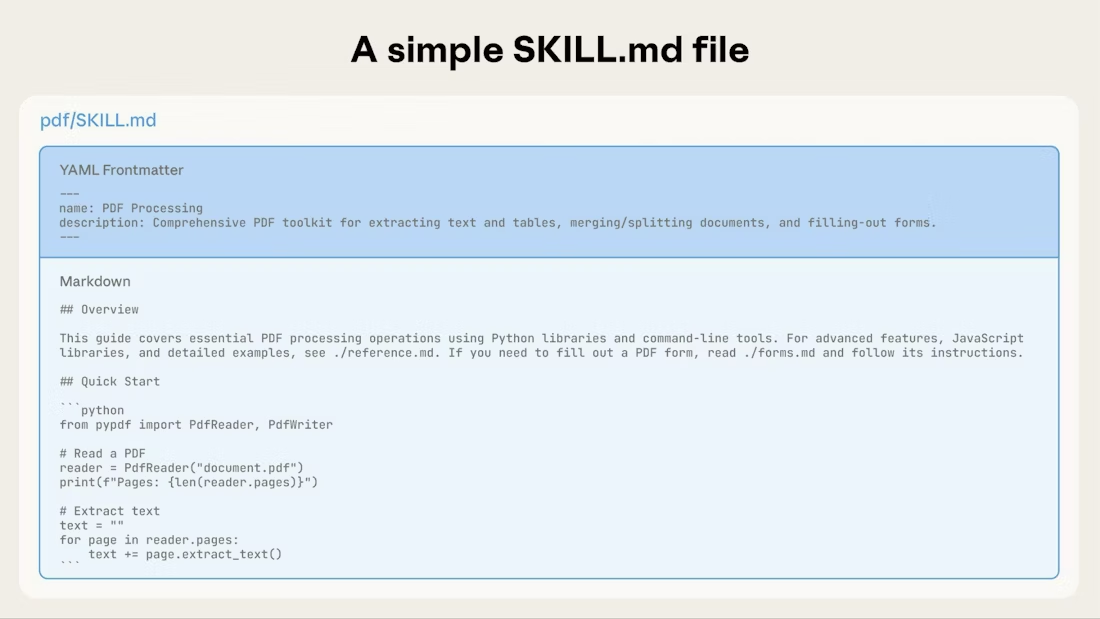
视觉概览:从简单到复杂
一个基本的 Skills 始于一个仅包含元数据和指令的 SKILL.md 文件:
随着 Skills 的增长,您可以捆绑额外的内容,Claude 仅在需要时加载它们:
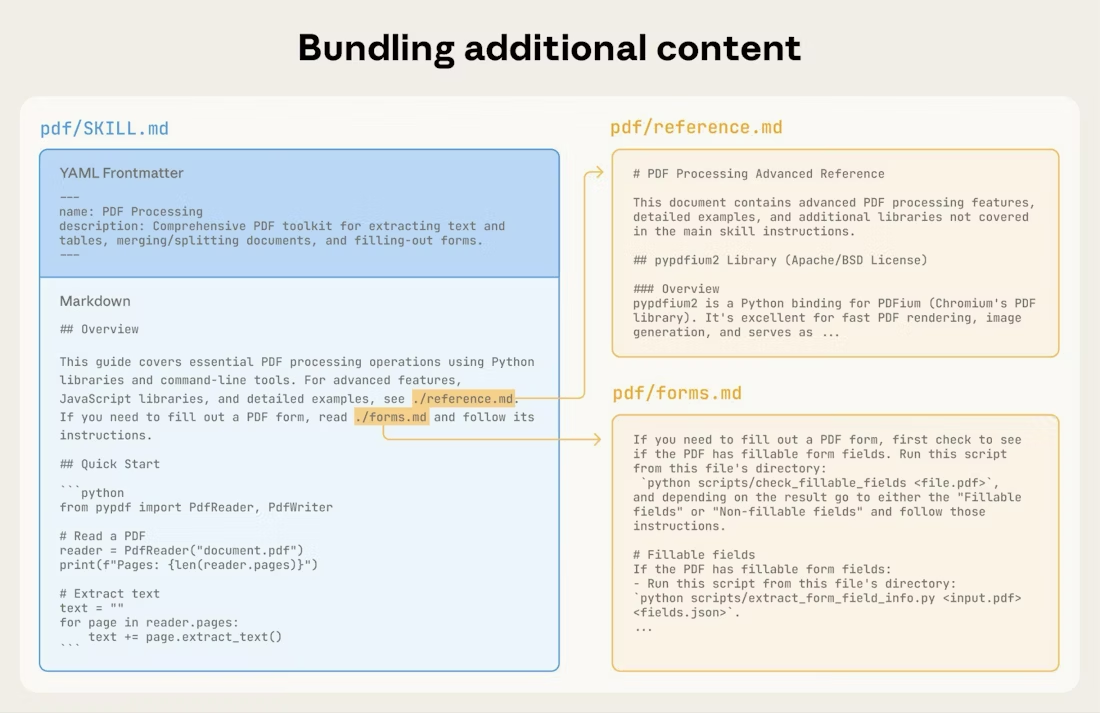
完整的 Skills 目录结构可能如下所示:
1 | pdf/ |
模式 1:带有参考的高级指南
1 | --- |
Claude 仅在需要时加载 FORMS.md、REFERENCE.md 或 EXAMPLES.md。
模式 2:特定领域的组织
对于具有多个领域的 Skills ,按领域组织内容以避免加载不相关的上下文。当用户询问销售指标时,Claude 只需要读取与销售相关的模式,而不需要读取财务或营销数据。这可以保持较低的 token 使用量并使上下文保持专注。
1 | bigquery-skill/ |
1 | # BigQuery Data Analysis |
模式 3:条件性细节
显示基本内容,链接到高级内容:
1 | # DOCX Processing |
只有当用户需要这些功能时,Claude 才会读取 REDLINING.md 或 OOXML.md。
避免深度嵌套的引用
当文件被其他被引用的文件引用时,Claude 可能会部分读取这些文件。遇到嵌套引用时,Claude 可能会使用 head -100 之类的命令来预览内容,而不是读取整个文件,从而导致信息不完整。
将引用保持在 SKILL.md 的一层深度。所有参考文件都应直接从 SKILL.md 链接,以确保 Claude 在需要时能读取完整文件。
不好的例子:太深:
1 | # SKILL.md |
好的例子:一层深度:
1 | # SKILL.md |
用目录来组织较长的参考文件
对于超过 100 行的参考文件,在顶部包含一个目录。这确保了即使在通过部分读取进行预览时,Claude 也能看到可用信息的全部范围。
例子:
1 | # API Reference |
有关这种基于文件系统的架构如何实现渐进式披露的详细信息,请参阅下面高级部分中的运行时环境部分。
工作流和反馈循环
使用工作流处理复杂任务
将复杂操作分解为清晰、顺序的步骤。对于特别复杂的工作流,提供一个清单,Claude 可以将其复制到其响应中,并随着进度进行核对。
示例 1:研究综合工作流(对于没有代码的 Skills ):
1 | ## Research synthesis workflow |
此示例展示了工作流如何应用于不需要代码的分析任务。清单模式适用于任何复杂、多步骤的过程。
示例 2:PDF 表单填写工作流(对于有代码的 Skills ):
1 | ## PDF form filling workflow |
清晰的步骤可以防止 Claude 跳过关键的验证环节。清单有助于 Claude 和您跟踪多步骤工作流的进度。
实现反馈循环
常见模式:运行验证器 → 修复错误 → 重复
这种模式大大提高了输出质量。
示例 1:风格指南合规性(对于没有代码的 Skills ):
1 | ## Content review process |
验证循环能及早发现错误。
内容指南
避免时效性信息
不要包含会过时的信息:
不好的例子:时效性(会变得错误):
1 | If you're doing this before August 2025, use the old API. |
好的例子(使用“旧模式”部分):
1 | ## Current method |
旧模式部分提供了历史背景,而不会使主要内容变得混乱。
使用一致的术语
选择一个术语并在整个 Skills 中始终使用它:
好 - 一致:
- 总是用“API endpoint”
- 总是用“field”
- 总是用“extract”
不好 - 不一致:
- 混用“API endpoint”、“URL”、“API route”、“path”
- 混用“field”、“box”、“element”、“control”
- 混用“extract”、“pull”、“get”、“retrieve”
一致性有助于 Claude 理解和遵循指令。
常见模式
模板模式
为输出格式提供模板。根据您的需求匹配严格程度。
对于严格要求(如 API 响应或数据格式):
1 | ## Report structure |
对于灵活的指导(当适应性有用时):
1 | ## Report structure |
示例模式
对于输出质量依赖于示例的 Skills ,提供输入/输出对,就像在常规提示中一样:
1 | ## Commit message format |
示例比单纯的描述更能帮助 Claude 理解所需的风格和细节程度。
条件工作流模式
引导 Claude 通过决策点:
1 | ## Document modification workflow |
如果工作流变得庞大或包含许多复杂步骤,请考虑将它们推送到单独的文件中,并告诉 Claude 根据手头的任务读取相应的文件。
评估与迭代
首先构建评估
在编写大量文档之前创建评估。这能确保您的 Skills 解决的是真实问题,而不是为想象中的问题编写文档。
评估驱动开发:
- 识别差距:在没有 Skills 的情况下,让 Claude 执行代表性任务。记录具体的失败或缺失的上下文。
- 创建评估:构建三个测试这些差距的场景。
- 建立基线:测量 Claude 在没有 Skills 时的表现。
- 编写最简指令:只创建足以解决差距并通过评估的内容。
- 迭代:执行评估,与基线进行比较,并进行优化。
这种方法确保您解决的是实际问题,而不是预测可能永远不会出现的需求。
评估结构:
1 | { |
此示例演示了带有简单测试标准的数据驱动评估。我们目前不提供内置的方式来运行这些评估。用户可以创建自己的评估系统。评估是衡量 Skills 有效性的事实来源。
与 Claude 迭代开发 Skills
最有效的 Skills 开发过程涉及到 Claude 本身。与一个 Claude 实例(“Claude A”)合作,创建一个将由其他实例(“Claude B”)使用的 Skills 。Claude A 帮助您设计和完善指令,而 Claude B 则在实际任务中测试它们。这之所以有效,是因为 Claude 模型既了解如何编写有效的 Agent 指令,也了解 Agent 需要什么信息。
**创建一个新 Skills **:
- 在没有 Skills 的情况下完成任务:使用正常的提示与 Claude A 一起解决一个问题。在工作过程中,您会自然地提供上下文、解释偏好并分享程序性知识。注意您反复提供的信息。
- 识别可复用模式:完成任务后,识别您提供的哪些上下文对未来类似任务有用。例如:如果您完成了一次 BigQuery 分析,您可能提供了表名、字段定义、过滤规则(如“始终排除测试账户”)和常见的查询模式。
- 请求 Claude A 创建一个 Skills:“创建一个 Skills ,捕捉我们刚才使用的这个 BigQuery 分析模式。包括表结构、命名约定和关于过滤测试账户的规则。”
Claude 模型原生理解 Skills 的格式和结构。您不需要特殊的系统提示或“编写 Skills ”的Skills来让 Claude 帮助创建Skills。只需请求 Claude 创建一个Skills,它就会生成结构正确的 SKILL.md 内容,包含适当的 frontmatter 和主体内容。
- 审查简洁性:检查 Claude A 是否添加了不必要的解释。提问:“删除关于胜率含义的解释——Claude 已经知道了。”
- 改进信息架构:请求 Claude A 更有效地组织内容。例如:“将这个组织一下,使表结构放在一个单独的参考文件中。我们稍后可能会添加更多的表。”
- 在类似任务上测试:在相关的用例上,使用带有该Skills的 Claude B(一个加载了Skills的新实例)进行测试。观察 Claude B 是否能找到正确的信息,正确应用规则,并成功处理任务。
- 根据观察进行迭代:如果 Claude B 遇到困难或遗漏了什么,带着具体情况回到 Claude A:“当 Claude 使用这个Skills时,它忘记按日期过滤第四季度的数据。我们是否应该添加一个关于日期过滤模式的部分?”
迭代现有Skills:
在改进Skills时,同样的分层模式仍在继续。您在以下角色之间交替:
- 与 Claude A(帮助完善Skills的专家)合作
- 用 Claude B(使用Skills执行实际工作的 Agent)进行测试
- 观察 Claude B 的行为,并将见解带回给 Claude A
- 在实际工作流中使用Skills:给 Claude B(加载了Skills)分配实际任务,而不是测试场景。
- 观察 Claude B 的行为:注意它在哪些地方遇到困难、成功或做出意外的选择。例如观察:“当我向 Claude B 索要区域销售报告时,它编写了查询,但忘记过滤掉测试账户,尽管Skills中提到了这条规则。”
- 回到 Claude A 进行改进:分享当前的 SKILL.md 并描述您的观察。提问:“我注意到当我索要区域报告时,Claude B 忘记过滤测试账户。Skills中提到了过滤,但可能不够突出?”
- 审查 Claude A 的建议:Claude A 可能会建议重新组织以使规则更突出,使用更强的措辞如“MUST filter”而不是“always filter”,或者重构工作流部分。
- 应用并测试更改:用 Claude A 的改进更新Skills,然后在类似请求上再次用 Claude B 进行测试。
- 根据使用情况重复:随着您遇到新场景,继续这个观察-完善-测试的循环。每一次迭代都是基于真实的 Agent 行为而不是假设来改进Skills。
收集团队反馈:
- 与团队成员分享Skills并观察他们的使用情况。
- 提问:Skills是否在预期时激活?指令是否清晰?缺少了什么?
- 采纳反馈以解决您自己使用模式中的盲点。
为什么这种方法有效:Claude A 理解 Agent 的需求,您提供领域专业知识,Claude B 通过实际使用揭示差距,而迭代改进则是基于观察到的行为而非假设来提升Skills。
观察 Claude 如何导航Skills
在迭代Skills时,请注意 Claude 在实践中实际如何使用它们。观察:
- 意外的探索路径:Claude 是否以您未预料到的顺序读取文件?这可能表明您的结构不如您想象的那么直观。
- 错过的连接:Claude 是否未能跟随指向重要文件的引用?您的链接可能需要更明确或更突出。
- 对某些部分的过度依赖:如果 Claude 反复读取同一个文件,请考虑该内容是否应放在主 SKILL.md 中。
- 被忽略的内容:如果 Claude 从未访问过某个捆绑文件,它可能是不必要的,或者在主指令中提示得不够好。
基于这些观察而不是假设进行迭代。Skills元数据中的“name”和“description”尤为关键。Claude 在决定是否为当前任务触发Skills时会使用它们。确保它们清楚地描述了Skills的作用和应该在何时使用。
要避免的反模式
避免 Windows 风格的路径
始终在文件路径中使用正斜杠,即使在 Windows 上也是如此:
- ✓ 好:
scripts/helper.py,reference/guide.md - ✗ 避免:
scripts\helper.py,reference\guide.md
Unix 风格的路径在所有平台上都有效,而 Windows 风格的路径在 Unix 系统上会导致错误。
避免提供太多选项
除非必要,否则不要提供多种方法:
1 | **不好的例子:太多选择** (令人困惑): |
高级:带有可执行代码的Skills
以下部分重点介绍包含可执行脚本的Skills。如果您的Skills只使用 markdown 指令,请跳至有效Skills清单。
解决问题,而不是推卸责任
在为Skills编写脚本时,要处理错误条件,而不是把问题推给 Claude。
好的例子:明确处理错误:
1 | def process_file(path): |
不好的例子:推给 Claude:
1 | def process_file(path): |
配置参数也应有合理的理由并进行文档记录,以避免“巫术常量”(Ousterhout 定律)。如果您不知道正确的值,Claude 又将如何确定它呢?
好的例子:自文档化:
1 | # HTTP requests typically complete within 30 seconds |
不好的例子:魔法数字:
1 | TIMEOUT = 47 # Why 47? |
提供实用工具脚本
即使 Claude 可以编写脚本,预制脚本也具有优势:
实用工具脚本的好处:
- 比生成的代码更可靠
- 节省 token(无需在上下文中包含代码)
- 节省时间(无需生成代码)
- 确保跨用途的一致性
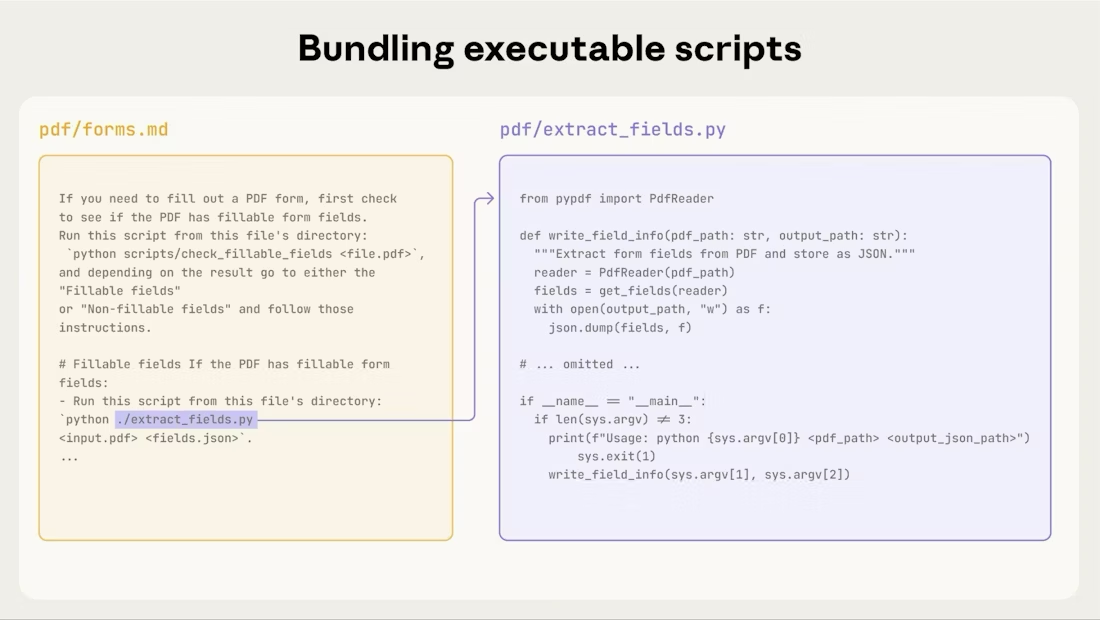
上图显示了可执行脚本如何与指令文件协同工作。指令文件(forms.md)引用脚本,Claude 可以执行它而无需将其内容加载到上下文中。
重要区别:在您的指令中明确指出 Claude 应该:
- 执行脚本(最常见):“运行
analyze_form.py来提取字段” - 将其作为参考阅读(对于复杂逻辑):“请参阅
analyze_form.py了解字段提取算法”
对于大多数实用工具脚本,执行是首选,因为它更可靠、更高效。有关脚本执行工作原理的详细信息,请参阅下面的运行时环境部分。
例子:
1 | ## Utility scripts |
使用视觉分析
当输入可以渲染为图像时,让 Claude 对其进行分析:
1 | ## Form layout analysis |
在这个例子中,您需要编写
pdf_to_images.py脚本。
Claude 的视觉能力有助于理解布局和结构。
创建可验证的中间输出
当 Claude 执行复杂、开放式任务时,它可能会犯错。“计划-验证-执行”模式通过让 Claude 首先以结构化格式创建计划,然后在使用脚本验证该计划之后再执行,从而及早发现错误。
例子:想象一下,要求 Claude 根据电子表格更新 PDF 中的 50 个表单字段。没有验证,Claude 可能会引用不存在的字段、创建冲突的值、遗漏必填字段或错误地应用更新。
解决方案:使用上面显示的(PDF 表单填写)工作流模式,但添加一个中间的 changes.json 文件,在应用更改之前对其进行验证。工作流变为:分析 → 创建计划文件 → 验证计划 → 执行 → 验证。
为什么这个模式有效:
- 及早发现错误:验证在应用更改之前发现问题
- 机器可验证:脚本提供客观验证
- 可逆的计划:Claude 可以在不触及原始文件的情况下迭代计划
- 清晰的调试:错误消息指向具体问题
何时使用:批量操作、破坏性更改、复杂的验证规则、高风险操作。
实施技巧:使验证脚本具有详细的特定错误消息,如“未找到字段 ‘signature_date’。可用字段:customer_name, order_total, signature_date_signed”,以帮助 Claude 修复问题。
打包依赖项
Skills在代码执行环境中运行,并有特定于平台的限制:
- claude.ai:可以从 npm 和 PyPI 安装包,并从 GitHub 仓库拉取
- Anthropic API:没有网络访问权限,也无法在运行时安装包
在您的 SKILL.md 中列出所需的包,并在代码执行工具文档中验证它们是否可用。
运行时环境
Skills在具有文件系统访问、bash 命令和代码执行能力的代码执行环境中运行。有关此架构的概念性解释,请参阅概述中的Skills架构。
这对您的编写有何影响:
Claude 如何访问Skills:
- 元数据预加载:启动时,所有Skills的 YAML frontmatter 中的名称和描述都会被加载到系统提示中
- 文件按需读取:当需要时,Claude 使用 bash Read 工具从文件系统中访问 SKILL.md 和其他文件
- 脚本高效执行:实用工具脚本可以通过 bash 执行,而无需将其全部内容加载到上下文中。只有脚本的输出会消耗 token
- 大文件没有上下文惩罚:参考文件、数据或文档在实际被读取之前不会消耗上下文 token
- 文件路径很重要:Claude 像浏览文件系统一样导航您的Skills目录。使用正斜杠(reference/guide.md),而不是反斜杠
- 文件命名要具描述性:使用能表明内容的名称:form_validation_rules.md,而不是 doc2.md
- 为发现而组织:按领域或功能组织目录
- 好:reference/finance.md, reference/sales.md
- 不好:docs/file1.md, docs/file2.md
- 捆绑全面的资源:包括完整的 API 文档、大量示例、大型数据集;在访问之前没有上下文惩罚
- 确定性操作首选脚本:编写 validate_form.py 而不是要求 Claude 生成验证代码
- 明确执行意图:
- “运行
analyze_form.py来提取字段”(执行) - “请参阅
analyze_form.py了解提取算法”(作为参考阅读)
- “运行
- 测试文件访问模式:通过实际请求测试,验证 Claude 是否可以导航您的目录结构
例子:
1 | bigquery-skill/ |
当用户询问收入时,Claude 读取 SKILL.md,看到对 reference/finance.md 的引用,并调用 bash 只读取该文件。sales.md 和 product.md 文件保留在文件系统上,在需要之前消耗零上下文 token。这种基于文件系统的模型是实现渐进式披露的原因。Claude 可以导航并选择性地加载每个任务所需的确切内容。
有关技术架构的完整详细信息,请参阅Skills概述中的Skills如何工作。
MCP 工具引用
如果您的Skills使用 MCP (Model Context Protocol) 工具,请始终使用完全限定的工具名称以避免“找不到工具”的错误。
格式:ServerName:tool_name
例子:
1 | Use the BigQuery:bigquery_schema tool to retrieve table schemas. |
其中:BigQuery 和 GitHub 是 MCP 服务器名称bigquery_schema 和 create_issue 是这些服务器中的工具名称
没有服务器前缀,Claude 可能无法找到该工具,尤其是在有多个 MCP 服务器可用时。
避免假设工具已安装
不要假设包是可用的:
1 | **不好的例子:假设已安装**: |
技术说明
YAML frontmatter 要求
SKILL.md frontmatter 只包括 name(最多 64 个字符)和 description(最多 1024 个字符)字段。有关完整的结构细节,请参阅Skills概述。
Token 预算
为获得最佳性能,请将 SKILL.md 主体内容保持在 500 行以下。如果您的内容超过此限制,请使用前面描述的渐进式披露模式将其拆分到单独的文件中。有关架构细节,请参阅Skills概述。
有效Skills清单
在分享Skills之前,请核实:
核心质量
- 描述具体且包含关键词
- 描述既包括Skills的作用,也包括何时使用
- SKILL.md 主体内容在 500 行以下
- 附加细节在单独的文件中(如果需要)
- 没有时效性信息(或在“旧模式”部分)
- 术语始终保持一致
- 示例是具体的,而不是抽象的
- 文件引用是一层深度
- 适当地使用了渐进式披露
- 工作流有清晰的步骤
代码和脚本
- 脚本解决问题,而不是推卸给 Claude
- 错误处理明确且有帮助
- 没有“巫术常量”(所有值都有合理解释)
- 所需的包在指令中列出并验证可用
- 脚本有清晰的文档
- 没有 Windows 风格的路径(全部使用正斜杠)
- 关键操作有验证/核实步骤
- 质量关键任务包含反馈循环
测试
- 创建了至少三个评估
- 使用 Haiku、Sonnet 和 Opus 进行了测试
- 使用真实的使用场景进行了测试
- 采纳了团队反馈(如果适用)